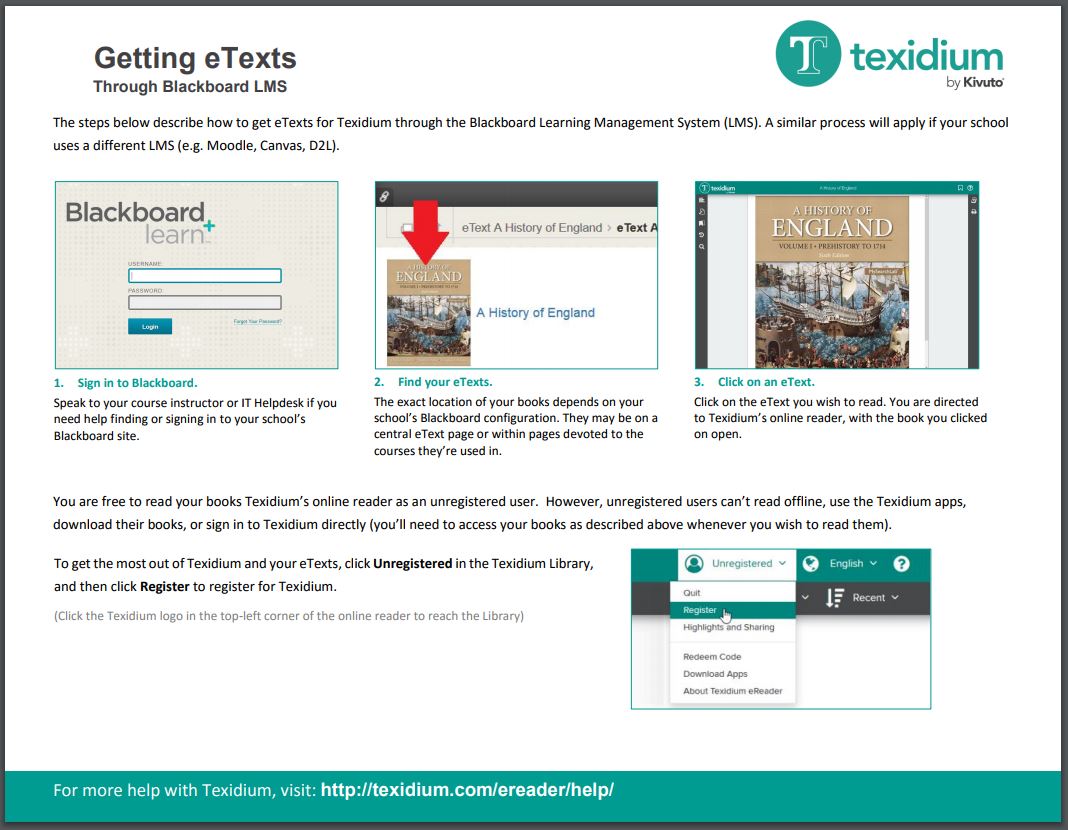

Getting eTexts through Blackboard, Moodle, Canvas or D2L
To obtain eTexts through a Learning Management System (e.g. Blackboard, Moodle, Canvas, D2L):
- Sign in to your school’s Learning Management System.
- Find and click on the icon of the book you need. You are directed to Texidium’s online reader, with the book you clicked open and ready to read.
Note: At this point you are considered an “unregistered” user. Unregistered users can access books through the site they where they were obtained and read them in the online reader. However, they cannot sign in to Texidium directly, download their books to a device, or read offline. To get the most from Texidium and your eTexts, you need to create a Texidium account.
See the related video and tip sheet to learn more about obtaining eTexts through an LMS. Video captions are available in English and Spanish.
Video – Getting eTexts through an LMS
Getting eTexts through the Blackboard Learning Management System from Kivuto Solutions on Vimeo.
Tip Sheet – Getting eTexts through Blackboard LMS